> ## Documentation Index
> Fetch the complete documentation index at: https://cometchat-22654f5b-docs-rn-push-notifications-unified.mintlify.site/llms.txt
> Use this file to discover all available pages before exploring further.
# React Native Push Notifications (iOS)
> CometChat push notifications and VoIP calls in React Native apps on iOS using Apple Push Notification service (APNs), PushKit and CallKit, with the @cometchat/push-notifications-react-native package.
| Field | Value |
| -------------- | -------------------------------------------------------------------------------------------------------------------------------------------------------------------------------------------------------------------------------------------------- |
| Platform | iOS (APNs + PushKit + CallKit) |
| Package | `@cometchat/push-notifications-react-native` |
| Key APIs | `CometChatPushNotifications.init()`, `onNotificationTap()`, `onCallAccepted()`, `onCallEnded()`, `unregister()`, `CometChatPushNotificationsAppDelegate.registerForVoIPPushes()`, `CometChatPushNotificationsAppDelegate.didRegisterAPNsToken(_:)` |
| Push Platforms | `APNS_REACT_NATIVE_DEVICE` and `APNS_REACT_NATIVE_VOIP`, registered by `init()` with one `apnsProviderId` |
| Native setup | Push Notifications + Background Modes (Voice over IP, Remote notifications, Audio), microphone and camera usage strings, and in `AppDelegate`: `registerForVoIPPushes()` before React Native starts plus the APNs token method |
| Prerequisites | CometChat initialized and the user logged in before `init()`, an APNs provider ID, a physical device |
Reference implementation of React Native UI Kit, APNs and Push Notification Setup.
## What this guide covers
* CometChat dashboard setup (enable push, add an APNs provider) with screenshots.
* Apple setup (APNs key, capabilities, `Info.plist`).
* Wiring the package's notification and call handlers into your app.
* Native iOS setup — a few `AppDelegate` lines; no PushKit or CallKit code to write.
* Token registration (APNs + VoIP), notification/call handling, navigation, testing, and troubleshooting.
* App icon badge count using `unreadMessageCount` from the CometChat push payload.
## How APNs + CometChat work together
* **APNs's role:** Issues the device token for chat notifications and, through PushKit, the VoIP token for calls, and delivers both kinds of push. No Firebase is needed on iOS.
* **CometChat's role:** The APNs provider you add in the CometChat dashboard holds your `.p8` key. When `init()` runs after login, the package registers both tokens with that one provider, and CometChat sends chat pushes and VoIP call pushes through APNs.
* **The package's role:** It creates and owns the PushKit registry and reports every VoIP push to CallKit — before React Native starts in a killed app. Every CometChat action runs in JavaScript through the Chat SDK your app already uses.
* **Flow:** Permission prompt → APNs issues the device token and PushKit the VoIP token → after login, `init()` registers both with `AppCredentials.apnsProviderId` → CometChat sends to APNs → iOS shows the notification, or the package reports the call to CallKit → your `onNotificationTap`, `onCallAccepted` and `onCallEnded` handlers navigate.
## 1. Enable push and add providers (CometChat Dashboard)
1. Go to **Notifications → Settings** and enable **Push Notifications**.
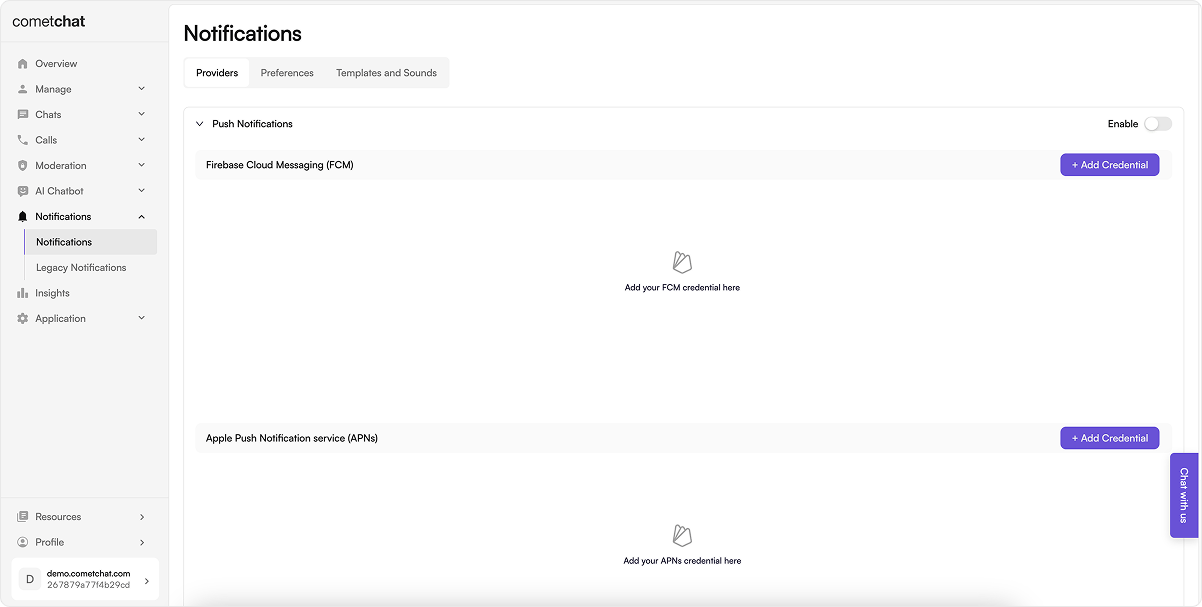 2. Click **Add Credentials**, choose **APNs**, upload your `.p8` key with its Key ID and Team ID, and copy the Provider ID. One APNs provider covers both chat notifications and VoIP call pushes.
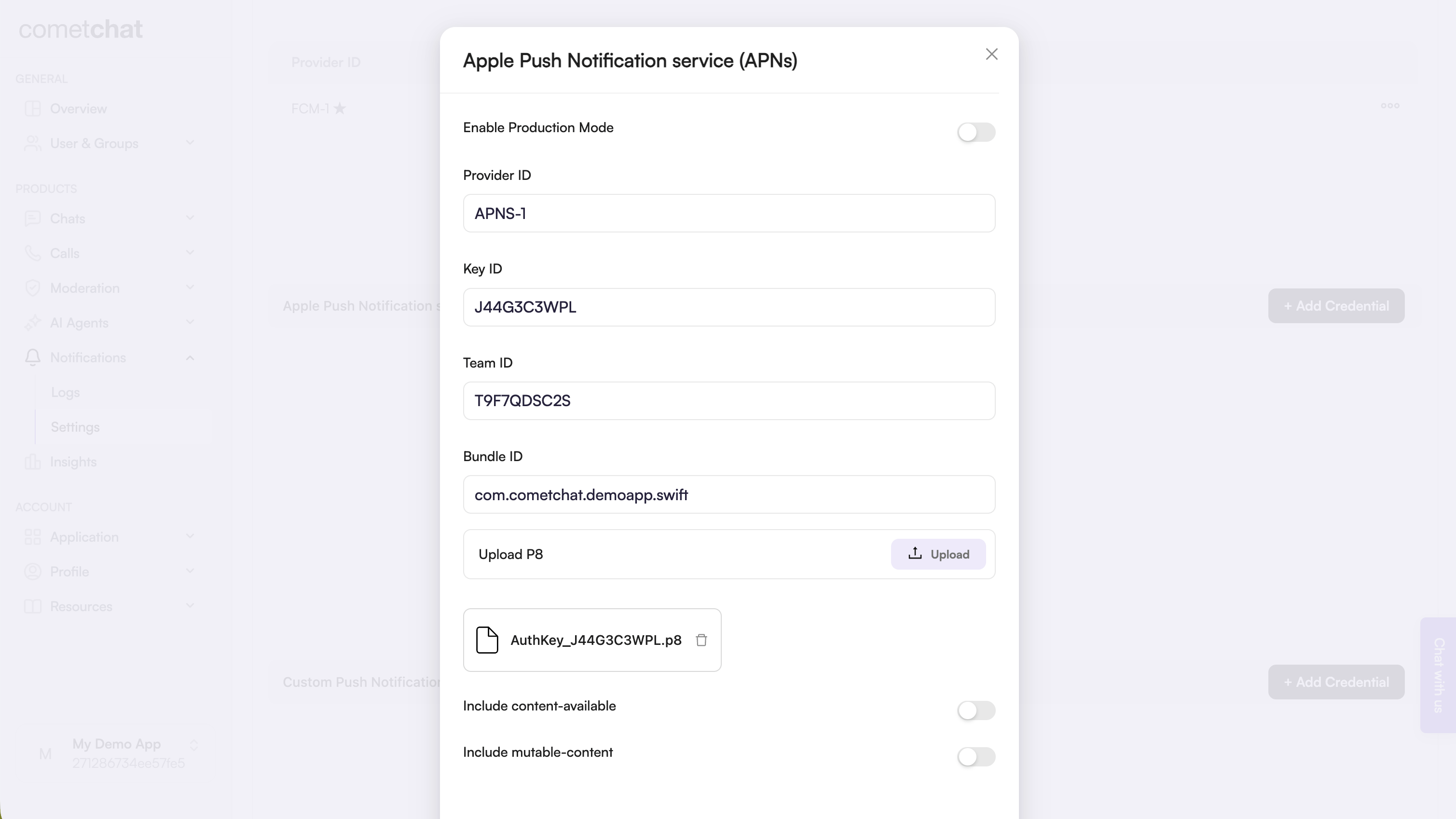 Keep the provider ID—you'll use it in `AppCredentials.apnsProviderId`.
## 2. Prepare Apple credentials
### 2.1 Apple Developer portal
1. Generate an APNs Auth Key (`.p8`) and note the **Key ID** and **Team ID**.
2. Enable Push Notifications on your app's bundle ID.
**`.p12` certificates are deprecated.** Apple recommends `.p8` Auth Keys for push notifications: they never expire and work across all your apps.
## 3. Local configuration file
Create `src/AppCredentials.ts` with your app credentials and provider IDs. The same file serves the [Android guide](/notifications/react-native-push-notifications-android):
```ts src/AppCredentials.ts lines theme={null}
export const AppCredentials = {
appId: 'YOUR_APP_ID',
region: 'YOUR_REGION',
authKey: 'YOUR_AUTH_KEY',
// Android — the FCM provider ID from the CometChat dashboard
fcmProviderId: 'FCM-PROVIDER-ID',
// iOS — one APNs provider covers both the device token and the VoIP token
apnsProviderId: 'APNS-PROVIDER-ID',
};
```
## 4. Bring the push package into React Native
### 4.1 Install the package
```bash theme={null}
npm install @cometchat/push-notifications-react-native
cd ios && pod install && cd ..
```
Keep the Podfile's `platform :ios, min_ios_version_supported` from the React Native template. Don't lower it: current React Native requires iOS 15.1, and a lower platform fails the build — for example with `'hermes/hermes.h' file not found`.
**Remove other push and call libraries first** — `@react-native-firebase/messaging`, `@notifee/react-native`, `react-native-callkeep`, `react-native-voip-push-notification` — along with their code and native setup. Each registers its own push handler or PushKit registry, and every notification or call then arrives twice.
### 4.2 Wire the entry points
The JavaScript below is the same for Android and iOS — one set of files serves both guides. Lines for one platform do nothing on the other: `registerBackgroundCallTask()` and `notificationSmallIcon` only apply on Android, and waiting for each permission answer before the next request matters only on Android.
**`index.js`** — the same file as on Android. `registerBackgroundCallTask()` is a no-op on iOS, where CallKit handles a decline in a killed app:
```js index.js lines theme={null}
import { AppRegistry } from 'react-native';
import { registerBackgroundCallTask } from '@cometchat/push-notifications-react-native';
import App from './App';
import { name as appName } from './app.json';
// Android: lets a FULLY KILLED app reject a call declined from its notification. The package
// does the work — this only registers its background task. (No-op on iOS.)
registerBackgroundCallTask();
AppRegistry.registerComponent(appName, () => App);
```
**`src/navigation/navigationRef.ts`** — a notification tap or answered call that **launched** the app arrives before your navigator exists, so every navigation waits for it:
```ts src/navigation/navigationRef.ts lines theme={null}
import { createNavigationContainerRef } from '@react-navigation/native';
/** Pass this to your . */
export const navigationRef = createNavigationContainerRef();
/**
* Resolves once the NavigationContainer is mounted. A notification tap or answered call
* that LAUNCHED the app arrives before the navigator exists, and navigating then is
* silently dropped. The ref queues listeners added before it mounts.
*/
export function whenNavigationReady(): Promise {
if (navigationRef.isReady()) return Promise.resolve();
return new Promise(resolve => {
const unsubscribe = navigationRef.addListener('ready', () => {
unsubscribe();
resolve();
});
});
}
/** Navigate by route name once the navigator is ready. */
export async function navigate(name: string, params?: object): Promise {
await whenNavigationReady();
(navigationRef.navigate as (name: string, params?: object) => void)(name, params);
}
```
**`src/push/pushNotifications.ts`** — everything push does for the logged-in user: the tap, call-accepted and call-ended handlers, the permission requests, and `init()`:
```ts src/push/pushNotifications.ts lines theme={null}
import { useEffect, useState } from 'react';
import { CometChat } from '@cometchat/chat-sdk-react-native';
import { CometChatCalls } from '@cometchat/calls-sdk-react-native';
import { CometChatUIEventHandler, MessageEvents } from '@cometchat/chat-uikit-react-native';
import {
CometChatPNHelper,
CometChatPushNotifications,
type PNCallEndEvent,
type PNCallInfo,
type PNNotificationTapInfo,
} from '@cometchat/push-notifications-react-native';
import { AppCredentials } from '../AppCredentials';
import { navigate, navigationRef } from '../navigation/navigationRef';
/** Your navigator's route names — these are the CometChat UI Kit sample app's. */
const SCREENS = {
messages: 'Messages',
thread: 'ThreadView',
ongoingCall: 'OngoingCallScreen',
home: 'BottomTabNavigator',
} as const;
const LOGIN_LISTENER_ID = 'push-notifications-login';
/**
* Starts push for the logged-in user. Call it from React with `usePushOnLogin()` (below)
* rather than directly: it returns a cleanup that must run on logout, or every handler
* fires twice after the next login.
*/
export function setupPushOnLogin(): () => void {
// Subscribe BEFORE init(): the tap or answered call that LAUNCHED the app is delivered
// as soon as init() runs.
const unsubscribes = [
CometChatPushNotifications.onNotificationTap(openFromNotification),
CometChatPushNotifications.onCallAccepted(openCallScreen),
CometChatPushNotifications.onCallEnded(endCall),
];
const start = async () => {
// Await each permission request before the next — Android allows only one pending
// request per activity. A rejection means the OS could not be asked (not that the user
// declined), and must not stop init(): the push token still has to register.
await CometChatPNHelper.requestNotificationPermission().catch(() => false);
await CometChatPNHelper.requestCallPermissions(); // mic + camera, needed before a call connects
await CometChatPushNotifications.init({
fcmProviderId: AppCredentials.fcmProviderId, // Android
apnsProviderId: AppCredentials.apnsProviderId, // iOS (APNs device + VoIP)
notificationSmallIcon: 'ic_notification', // Android status-bar icon
showInForeground: true, // one notification while the app is open, too
ringInForeground: false, // your app rings while it's open — see src/calls/IncomingCall.tsx
});
};
start().catch(error => console.log('Push setup failed:', error));
return () => unsubscribes.forEach(unsubscribe => unsubscribe());
}
/**
* Runs push while a user is logged in — after a fresh login AND after a session restored
* on launch — and cleans up on logout. Use it once, in a component rendered after
* CometChat has been initialized.
*/
export function usePushOnLogin(): void {
const [loggedIn, setLoggedIn] = useState(false);
useEffect(() => {
// A restored session never fires loginSuccess, so check once on mount.
CometChat.getLoggedinUser()
.then(user => setLoggedIn(!!user))
.catch(() => setLoggedIn(false));
CometChat.addLoginListener(
LOGIN_LISTENER_ID,
new CometChat.LoginListener({
loginSuccess: () => setLoggedIn(true),
logoutSuccess: () => setLoggedIn(false),
}),
);
return () => CometChat.removeLoginListener(LOGIN_LISTENER_ID);
}, []);
useEffect(() => {
if (!loggedIn) return;
return setupPushOnLogin();
}, [loggedIn]);
}
/** Open the thread for a thread reply, otherwise the conversation. */
async function openFromNotification(info: PNNotificationTapInfo): Promise {
const isGroup = info.receiverType === 'group';
try {
const user = !isGroup && info.sender ? await CometChat.getUser(info.sender) : undefined;
const group = isGroup && info.receiver ? await CometChat.getGroup(info.receiver) : undefined;
if (!user && !group) return;
markConversationRead(isGroup ? info.receiver! : info.sender!, isGroup);
if (info.parentMessageId) {
try {
const parent = await CometChat.getMessageDetails(info.parentMessageId);
// The thread screen needs the user or group, not just the parent message.
await navigate(SCREENS.thread, { message: parent, user, group, highlightMessageId: info.messageId });
return;
} catch (error) {
console.log('Could not open the thread, opening the conversation:', error);
}
}
await navigate(SCREENS.messages, { user, group });
} catch (error) {
console.log('Could not open the conversation from a notification:', error);
}
}
/** Mark the conversation read and clear its unread badge in the UI Kit's conversation list. */
function markConversationRead(conversationWith: string, isGroup: boolean): void {
const type = isGroup ? CometChat.RECEIVER_TYPE.GROUP : CometChat.RECEIVER_TYPE.USER;
CometChat.markConversationAsRead(conversationWith, type)
.then(() => CometChat.getConversation(conversationWith, type))
.then(conversation => {
const lastMessage = conversation.getLastMessage();
if (lastMessage) {
CometChatUIEventHandler.emitMessageEvent(MessageEvents.ccMessageRead, { message: lastMessage });
}
})
.catch(error => console.log('Could not mark the conversation read:', error));
}
/** The package has already accepted the call — just show the call screen. */
function openCallScreen(info: PNCallInfo): void {
navigate(SCREENS.ongoingCall, { sessionId: info.sessionId, callType: info.callType });
}
/**
* A ringing call was cancelled or declined, or the user ended the call from the iOS call
* screen — which the Calls SDK does not see, so tear the call down here.
*/
function endCall(info: PNCallEndEvent): void {
if (info.sessionId) CometChat.endCall(info.sessionId).catch(() => {});
try {
CometChatCalls.endSession();
} catch {}
try {
CometChat.clearActiveCall();
} catch {}
if (navigationRef.isReady() && navigationRef.getCurrentRoute()?.name === SCREENS.ongoingCall) {
navigate(SCREENS.home);
}
}
```
**`src/calls/IncomingCall.tsx`** — `init()` above sets `ringInForeground: false`, so **while the app is open the package doesn't ring: your app must show its own incoming-call screen**, or calls won't ring at all while it's open. Calls reach an open app over the Chat SDK's connection; this component listens for them and shows the UI Kit's `CometChatIncomingCall`, which accepts the call and shows the call screen itself:
```tsx src/calls/IncomingCall.tsx lines theme={null}
import React, { useEffect, useState } from 'react';
import { CometChat } from '@cometchat/chat-sdk-react-native';
import { CometChatIncomingCall, CometChatUIEventHandler } from '@cometchat/chat-uikit-react-native';
const LISTENER_ID = 'incoming-call';
/**
* Rings for a call while the app is open — init() sets ringInForeground: false, so the
* package leaves this to the app. CometChatIncomingCall accepts the call and shows the call
* screen itself; this component shows it when a call arrives and removes it when the call is
* declined, cancelled by the caller, or ends.
*/
export function IncomingCall() {
const [call, setCall] = useState(null);
useEffect(() => {
CometChat.addCallListener(
LISTENER_ID,
new CometChat.CallListener({
onIncomingCallReceived: (incoming: CometChat.Call) => setCall(incoming),
onIncomingCallCancelled: () => setCall(null), // the caller hung up while it was ringing
}),
);
// An accepted call ended.
CometChatUIEventHandler.addCallListener(LISTENER_ID, { ccCallEnded: () => setCall(null) });
return () => {
CometChat.removeCallListener(LISTENER_ID);
CometChatUIEventHandler.removeCallListener(LISTENER_ID);
};
}, []);
if (!call) return null;
return setCall(null)} />;
}
```
Your app already shows an incoming-call screen while it's open? Keep it and skip this file. Don't want one? Set `ringInForeground: true` — the default — and skip this file: the package then rings with the system call UI while the app is open, too.
Not using the UI Kit? Delete the `@cometchat/chat-uikit-react-native` import and the `emitMessageEvent` block in `markConversationRead`, point `SCREENS` and the route params at your own screens, and in `logout.ts` call `CometChat.logout()` instead of `CometChatUIKit.logout()`. For calls while the app is open, set `ringInForeground: true`, or build your own incoming-call screen on `CometChat.addCallListener` in place of `IncomingCall.tsx`.
**`App.tsx`** — call `usePushOnLogin()` once, in a component that renders **after** CometChat is initialized, pass `navigationRef` to your `NavigationContainer`, and render `` **before** your navigator:
```tsx App.tsx lines theme={null}
import React, { useEffect, useState } from 'react';
import { NavigationContainer } from '@react-navigation/native';
import { CometChat } from '@cometchat/chat-sdk-react-native';
import { CometChatUIKit, UIKitSettings } from '@cometchat/chat-uikit-react-native';
import { AppCredentials } from './AppCredentials';
import { navigationRef } from './navigation/navigationRef';
import { usePushOnLogin } from './push/pushNotifications';
import { IncomingCall } from './calls/IncomingCall';
export default function App() {
const [initialized, setInitialized] = useState(false);
useEffect(() => {
// Your existing CometChat initialization.
CometChatUIKit.init({
appId: AppCredentials.appId,
region: AppCredentials.region,
authKey: AppCredentials.authKey,
subscriptionType: CometChat.AppSettings.SUBSCRIPTION_TYPE_ALL_USERS as UIKitSettings['subscriptionType'],
} as UIKitSettings)
.then(() => setInitialized(true))
.catch(error => console.log('CometChat init failed:', error));
}, []);
// Push must start only after CometChat is initialized.
if (!initialized) return null;
return ;
}
function Root() {
usePushOnLogin(); // push follows login and logout from here on
return (
{/* before your navigator: it shows at the top, and an accepted call fills the screen */}
{/* your existing navigator */}
);
}
```
`usePushOnLogin()` starts push after a fresh login **and** when a session is restored on launch, and removes the handlers when the user logs out — so a later login never registers them twice. `` goes before your navigator because the UI Kit's incoming-call screen isn't a modal: rendered first, it shows at the top of the screen, and an accepted call fills the screen.
### 4.3 Align dependencies and configuration
* **Peer dependencies:** `@cometchat/chat-sdk-react-native` (or the UI Kit) for chat, `@cometchat/calls-sdk-react-native` for calls, and React Navigation for the handlers above.
* **`init()` options:**
* `fcmProviderId` (Android) and `apnsProviderId` (iOS) — from step 1.
* `notificationSmallIcon` — the Android status-bar icon.
* `showInForeground` (default `false`) — show chat notifications while the app is open.
* `ringInForeground` (default `true`) — ring with the system call UI while the app is open. With `false`, a call that arrives while the app is open is left to your app, so your app must show its own incoming-call screen — `IncomingCall.tsx` above. With `false` and no such screen, calls don't ring while the app is open.
* `voip` (default `true`), `androidChannelId`, `androidChannelName`.
## 5. Configure the native iOS layer
### 5.1 Capabilities and Info.plist
1. Open `ios/.xcworkspace` in Xcode.
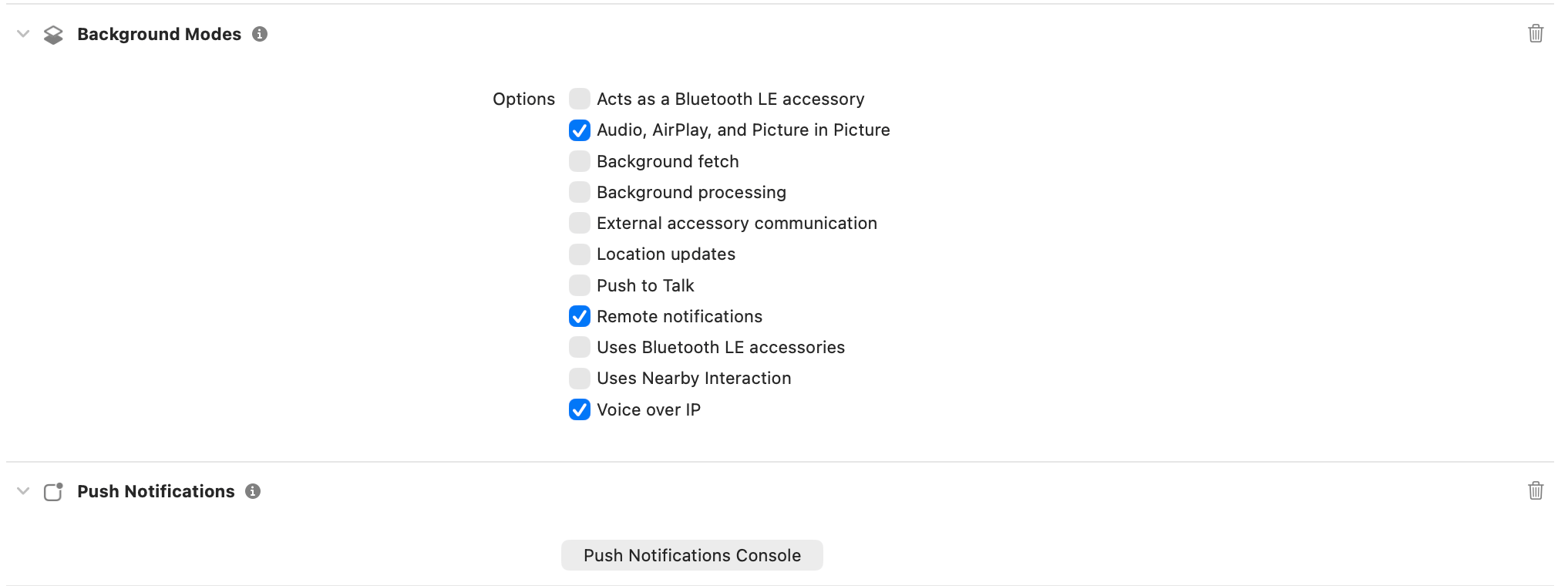
2. Under *Signing & Capabilities*, enable **Push Notifications** and **Background Modes** with **Voice over IP**, **Remote notifications**, and **Audio, AirPlay, and Picture in Picture**.
3. Add the microphone and camera usage strings to `Info.plist` — a call can't use either without them:
```xml ios//Info.plist lines theme={null}
NSMicrophoneUsageDescription
Needed for voice and video calls
NSCameraUsageDescription
Needed for video calls
```
Keep the provider ID—you'll use it in `AppCredentials.apnsProviderId`.
## 2. Prepare Apple credentials
### 2.1 Apple Developer portal
1. Generate an APNs Auth Key (`.p8`) and note the **Key ID** and **Team ID**.
2. Enable Push Notifications on your app's bundle ID.
**`.p12` certificates are deprecated.** Apple recommends `.p8` Auth Keys for push notifications: they never expire and work across all your apps.
## 3. Local configuration file
Create `src/AppCredentials.ts` with your app credentials and provider IDs. The same file serves the [Android guide](/notifications/react-native-push-notifications-android):
```ts src/AppCredentials.ts lines theme={null}
export const AppCredentials = {
appId: 'YOUR_APP_ID',
region: 'YOUR_REGION',
authKey: 'YOUR_AUTH_KEY',
// Android — the FCM provider ID from the CometChat dashboard
fcmProviderId: 'FCM-PROVIDER-ID',
// iOS — one APNs provider covers both the device token and the VoIP token
apnsProviderId: 'APNS-PROVIDER-ID',
};
```
## 4. Bring the push package into React Native
### 4.1 Install the package
```bash theme={null}
npm install @cometchat/push-notifications-react-native
cd ios && pod install && cd ..
```
Keep the Podfile's `platform :ios, min_ios_version_supported` from the React Native template. Don't lower it: current React Native requires iOS 15.1, and a lower platform fails the build — for example with `'hermes/hermes.h' file not found`.
**Remove other push and call libraries first** — `@react-native-firebase/messaging`, `@notifee/react-native`, `react-native-callkeep`, `react-native-voip-push-notification` — along with their code and native setup. Each registers its own push handler or PushKit registry, and every notification or call then arrives twice.
### 4.2 Wire the entry points
The JavaScript below is the same for Android and iOS — one set of files serves both guides. Lines for one platform do nothing on the other: `registerBackgroundCallTask()` and `notificationSmallIcon` only apply on Android, and waiting for each permission answer before the next request matters only on Android.
**`index.js`** — the same file as on Android. `registerBackgroundCallTask()` is a no-op on iOS, where CallKit handles a decline in a killed app:
```js index.js lines theme={null}
import { AppRegistry } from 'react-native';
import { registerBackgroundCallTask } from '@cometchat/push-notifications-react-native';
import App from './App';
import { name as appName } from './app.json';
// Android: lets a FULLY KILLED app reject a call declined from its notification. The package
// does the work — this only registers its background task. (No-op on iOS.)
registerBackgroundCallTask();
AppRegistry.registerComponent(appName, () => App);
```
**`src/navigation/navigationRef.ts`** — a notification tap or answered call that **launched** the app arrives before your navigator exists, so every navigation waits for it:
```ts src/navigation/navigationRef.ts lines theme={null}
import { createNavigationContainerRef } from '@react-navigation/native';
/** Pass this to your . */
export const navigationRef = createNavigationContainerRef();
/**
* Resolves once the NavigationContainer is mounted. A notification tap or answered call
* that LAUNCHED the app arrives before the navigator exists, and navigating then is
* silently dropped. The ref queues listeners added before it mounts.
*/
export function whenNavigationReady(): Promise {
if (navigationRef.isReady()) return Promise.resolve();
return new Promise(resolve => {
const unsubscribe = navigationRef.addListener('ready', () => {
unsubscribe();
resolve();
});
});
}
/** Navigate by route name once the navigator is ready. */
export async function navigate(name: string, params?: object): Promise {
await whenNavigationReady();
(navigationRef.navigate as (name: string, params?: object) => void)(name, params);
}
```
**`src/push/pushNotifications.ts`** — everything push does for the logged-in user: the tap, call-accepted and call-ended handlers, the permission requests, and `init()`:
```ts src/push/pushNotifications.ts lines theme={null}
import { useEffect, useState } from 'react';
import { CometChat } from '@cometchat/chat-sdk-react-native';
import { CometChatCalls } from '@cometchat/calls-sdk-react-native';
import { CometChatUIEventHandler, MessageEvents } from '@cometchat/chat-uikit-react-native';
import {
CometChatPNHelper,
CometChatPushNotifications,
type PNCallEndEvent,
type PNCallInfo,
type PNNotificationTapInfo,
} from '@cometchat/push-notifications-react-native';
import { AppCredentials } from '../AppCredentials';
import { navigate, navigationRef } from '../navigation/navigationRef';
/** Your navigator's route names — these are the CometChat UI Kit sample app's. */
const SCREENS = {
messages: 'Messages',
thread: 'ThreadView',
ongoingCall: 'OngoingCallScreen',
home: 'BottomTabNavigator',
} as const;
const LOGIN_LISTENER_ID = 'push-notifications-login';
/**
* Starts push for the logged-in user. Call it from React with `usePushOnLogin()` (below)
* rather than directly: it returns a cleanup that must run on logout, or every handler
* fires twice after the next login.
*/
export function setupPushOnLogin(): () => void {
// Subscribe BEFORE init(): the tap or answered call that LAUNCHED the app is delivered
// as soon as init() runs.
const unsubscribes = [
CometChatPushNotifications.onNotificationTap(openFromNotification),
CometChatPushNotifications.onCallAccepted(openCallScreen),
CometChatPushNotifications.onCallEnded(endCall),
];
const start = async () => {
// Await each permission request before the next — Android allows only one pending
// request per activity. A rejection means the OS could not be asked (not that the user
// declined), and must not stop init(): the push token still has to register.
await CometChatPNHelper.requestNotificationPermission().catch(() => false);
await CometChatPNHelper.requestCallPermissions(); // mic + camera, needed before a call connects
await CometChatPushNotifications.init({
fcmProviderId: AppCredentials.fcmProviderId, // Android
apnsProviderId: AppCredentials.apnsProviderId, // iOS (APNs device + VoIP)
notificationSmallIcon: 'ic_notification', // Android status-bar icon
showInForeground: true, // one notification while the app is open, too
ringInForeground: false, // your app rings while it's open — see src/calls/IncomingCall.tsx
});
};
start().catch(error => console.log('Push setup failed:', error));
return () => unsubscribes.forEach(unsubscribe => unsubscribe());
}
/**
* Runs push while a user is logged in — after a fresh login AND after a session restored
* on launch — and cleans up on logout. Use it once, in a component rendered after
* CometChat has been initialized.
*/
export function usePushOnLogin(): void {
const [loggedIn, setLoggedIn] = useState(false);
useEffect(() => {
// A restored session never fires loginSuccess, so check once on mount.
CometChat.getLoggedinUser()
.then(user => setLoggedIn(!!user))
.catch(() => setLoggedIn(false));
CometChat.addLoginListener(
LOGIN_LISTENER_ID,
new CometChat.LoginListener({
loginSuccess: () => setLoggedIn(true),
logoutSuccess: () => setLoggedIn(false),
}),
);
return () => CometChat.removeLoginListener(LOGIN_LISTENER_ID);
}, []);
useEffect(() => {
if (!loggedIn) return;
return setupPushOnLogin();
}, [loggedIn]);
}
/** Open the thread for a thread reply, otherwise the conversation. */
async function openFromNotification(info: PNNotificationTapInfo): Promise {
const isGroup = info.receiverType === 'group';
try {
const user = !isGroup && info.sender ? await CometChat.getUser(info.sender) : undefined;
const group = isGroup && info.receiver ? await CometChat.getGroup(info.receiver) : undefined;
if (!user && !group) return;
markConversationRead(isGroup ? info.receiver! : info.sender!, isGroup);
if (info.parentMessageId) {
try {
const parent = await CometChat.getMessageDetails(info.parentMessageId);
// The thread screen needs the user or group, not just the parent message.
await navigate(SCREENS.thread, { message: parent, user, group, highlightMessageId: info.messageId });
return;
} catch (error) {
console.log('Could not open the thread, opening the conversation:', error);
}
}
await navigate(SCREENS.messages, { user, group });
} catch (error) {
console.log('Could not open the conversation from a notification:', error);
}
}
/** Mark the conversation read and clear its unread badge in the UI Kit's conversation list. */
function markConversationRead(conversationWith: string, isGroup: boolean): void {
const type = isGroup ? CometChat.RECEIVER_TYPE.GROUP : CometChat.RECEIVER_TYPE.USER;
CometChat.markConversationAsRead(conversationWith, type)
.then(() => CometChat.getConversation(conversationWith, type))
.then(conversation => {
const lastMessage = conversation.getLastMessage();
if (lastMessage) {
CometChatUIEventHandler.emitMessageEvent(MessageEvents.ccMessageRead, { message: lastMessage });
}
})
.catch(error => console.log('Could not mark the conversation read:', error));
}
/** The package has already accepted the call — just show the call screen. */
function openCallScreen(info: PNCallInfo): void {
navigate(SCREENS.ongoingCall, { sessionId: info.sessionId, callType: info.callType });
}
/**
* A ringing call was cancelled or declined, or the user ended the call from the iOS call
* screen — which the Calls SDK does not see, so tear the call down here.
*/
function endCall(info: PNCallEndEvent): void {
if (info.sessionId) CometChat.endCall(info.sessionId).catch(() => {});
try {
CometChatCalls.endSession();
} catch {}
try {
CometChat.clearActiveCall();
} catch {}
if (navigationRef.isReady() && navigationRef.getCurrentRoute()?.name === SCREENS.ongoingCall) {
navigate(SCREENS.home);
}
}
```
**`src/calls/IncomingCall.tsx`** — `init()` above sets `ringInForeground: false`, so **while the app is open the package doesn't ring: your app must show its own incoming-call screen**, or calls won't ring at all while it's open. Calls reach an open app over the Chat SDK's connection; this component listens for them and shows the UI Kit's `CometChatIncomingCall`, which accepts the call and shows the call screen itself:
```tsx src/calls/IncomingCall.tsx lines theme={null}
import React, { useEffect, useState } from 'react';
import { CometChat } from '@cometchat/chat-sdk-react-native';
import { CometChatIncomingCall, CometChatUIEventHandler } from '@cometchat/chat-uikit-react-native';
const LISTENER_ID = 'incoming-call';
/**
* Rings for a call while the app is open — init() sets ringInForeground: false, so the
* package leaves this to the app. CometChatIncomingCall accepts the call and shows the call
* screen itself; this component shows it when a call arrives and removes it when the call is
* declined, cancelled by the caller, or ends.
*/
export function IncomingCall() {
const [call, setCall] = useState(null);
useEffect(() => {
CometChat.addCallListener(
LISTENER_ID,
new CometChat.CallListener({
onIncomingCallReceived: (incoming: CometChat.Call) => setCall(incoming),
onIncomingCallCancelled: () => setCall(null), // the caller hung up while it was ringing
}),
);
// An accepted call ended.
CometChatUIEventHandler.addCallListener(LISTENER_ID, { ccCallEnded: () => setCall(null) });
return () => {
CometChat.removeCallListener(LISTENER_ID);
CometChatUIEventHandler.removeCallListener(LISTENER_ID);
};
}, []);
if (!call) return null;
return setCall(null)} />;
}
```
Your app already shows an incoming-call screen while it's open? Keep it and skip this file. Don't want one? Set `ringInForeground: true` — the default — and skip this file: the package then rings with the system call UI while the app is open, too.
Not using the UI Kit? Delete the `@cometchat/chat-uikit-react-native` import and the `emitMessageEvent` block in `markConversationRead`, point `SCREENS` and the route params at your own screens, and in `logout.ts` call `CometChat.logout()` instead of `CometChatUIKit.logout()`. For calls while the app is open, set `ringInForeground: true`, or build your own incoming-call screen on `CometChat.addCallListener` in place of `IncomingCall.tsx`.
**`App.tsx`** — call `usePushOnLogin()` once, in a component that renders **after** CometChat is initialized, pass `navigationRef` to your `NavigationContainer`, and render `` **before** your navigator:
```tsx App.tsx lines theme={null}
import React, { useEffect, useState } from 'react';
import { NavigationContainer } from '@react-navigation/native';
import { CometChat } from '@cometchat/chat-sdk-react-native';
import { CometChatUIKit, UIKitSettings } from '@cometchat/chat-uikit-react-native';
import { AppCredentials } from './AppCredentials';
import { navigationRef } from './navigation/navigationRef';
import { usePushOnLogin } from './push/pushNotifications';
import { IncomingCall } from './calls/IncomingCall';
export default function App() {
const [initialized, setInitialized] = useState(false);
useEffect(() => {
// Your existing CometChat initialization.
CometChatUIKit.init({
appId: AppCredentials.appId,
region: AppCredentials.region,
authKey: AppCredentials.authKey,
subscriptionType: CometChat.AppSettings.SUBSCRIPTION_TYPE_ALL_USERS as UIKitSettings['subscriptionType'],
} as UIKitSettings)
.then(() => setInitialized(true))
.catch(error => console.log('CometChat init failed:', error));
}, []);
// Push must start only after CometChat is initialized.
if (!initialized) return null;
return ;
}
function Root() {
usePushOnLogin(); // push follows login and logout from here on
return (
{/* before your navigator: it shows at the top, and an accepted call fills the screen */}
{/* your existing navigator */}
);
}
```
`usePushOnLogin()` starts push after a fresh login **and** when a session is restored on launch, and removes the handlers when the user logs out — so a later login never registers them twice. `` goes before your navigator because the UI Kit's incoming-call screen isn't a modal: rendered first, it shows at the top of the screen, and an accepted call fills the screen.
### 4.3 Align dependencies and configuration
* **Peer dependencies:** `@cometchat/chat-sdk-react-native` (or the UI Kit) for chat, `@cometchat/calls-sdk-react-native` for calls, and React Navigation for the handlers above.
* **`init()` options:**
* `fcmProviderId` (Android) and `apnsProviderId` (iOS) — from step 1.
* `notificationSmallIcon` — the Android status-bar icon.
* `showInForeground` (default `false`) — show chat notifications while the app is open.
* `ringInForeground` (default `true`) — ring with the system call UI while the app is open. With `false`, a call that arrives while the app is open is left to your app, so your app must show its own incoming-call screen — `IncomingCall.tsx` above. With `false` and no such screen, calls don't ring while the app is open.
* `voip` (default `true`), `androidChannelId`, `androidChannelName`.
## 5. Configure the native iOS layer
### 5.1 Capabilities and Info.plist
1. Open `ios/.xcworkspace` in Xcode.
2. Under *Signing & Capabilities*, enable **Push Notifications** and **Background Modes** with **Voice over IP**, **Remote notifications**, and **Audio, AirPlay, and Picture in Picture**.
3. Add the microphone and camera usage strings to `Info.plist` — a call can't use either without them:
```xml ios//Info.plist lines theme={null}
NSMicrophoneUsageDescription
Needed for voice and video calls
NSCameraUsageDescription
Needed for video calls
```
 ### 5.2 `AppDelegate.swift`
Replace `ios//AppDelegate.swift` with this — React Native's current template plus the push lines. Set `withModuleName` to your app's name:
```swift ios//AppDelegate.swift lines theme={null}
import UIKit
import React
import React_RCTAppDelegate
import ReactAppDependencyProvider
import react_native_cometchat_push_notifications
@main
class AppDelegate: UIResponder, UIApplicationDelegate {
var window: UIWindow?
var reactNativeDelegate: ReactNativeDelegate?
var reactNativeFactory: RCTReactNativeFactory?
func application(
_ application: UIApplication,
didFinishLaunchingWithOptions launchOptions: [UIApplication.LaunchOptionsKey: Any]? = nil
) -> Bool {
let delegate = ReactNativeDelegate()
let factory = RCTReactNativeFactory(delegate: delegate)
delegate.dependencyProvider = RCTAppDependencyProvider()
reactNativeDelegate = delegate
reactNativeFactory = factory
// VoIP calls: the package creates and owns the PushKit registry. Call it BEFORE
// starting React Native — when a call wakes a killed app, iOS terminates the app
// unless the call reaches CallKit within ~5 seconds.
CometChatPushNotificationsAppDelegate.registerForVoIPPushes()
window = UIWindow(frame: UIScreen.main.bounds)
factory.startReactNative(
withModuleName: "YourAppName", // your app's registered name
in: window,
launchOptions: launchOptions
)
return true
}
// APNs device token — chat notifications
func application(
_ application: UIApplication,
didRegisterForRemoteNotificationsWithDeviceToken deviceToken: Data
) {
CometChatPushNotificationsAppDelegate.didRegisterAPNsToken(deviceToken)
}
// Optional — background data pushes reach onMessageReceived
func application(
_ application: UIApplication,
didReceiveRemoteNotification userInfo: [AnyHashable: Any],
fetchCompletionHandler completionHandler: @escaping (UIBackgroundFetchResult) -> Void
) {
CometChatPushNotificationsAppDelegate.didReceiveRemoteNotification(userInfo)
completionHandler(.noData)
}
}
class ReactNativeDelegate: RCTDefaultReactNativeFactoryDelegate {
override func sourceURL(for bridge: RCTBridge) -> URL? {
self.bundleURL()
}
override func bundleURL() -> URL? {
#if DEBUG
return RCTBundleURLProvider.sharedSettings().jsBundleURL(forBundleRoot: "index")
#else
return Bundle.main.url(forResource: "main", withExtension: "jsbundle")
#endif
}
}
```
You don't write PushKit or CallKit code, and you don't set a `UNUserNotificationCenter` delegate — the package installs its own at launch to handle foreground notifications and taps.
**Don't create a `PKPushRegistry` of your own.** The package owns it, and a second registry — yours or a library's — makes iOS deliver every VoIP push twice. If another library must own PushKit, skip `registerForVoIPPushes()` and forward that registry's `didUpdate` and `didReceiveIncomingPushWith` callbacks to `CometChatPushNotificationsAppDelegate.didUpdateVoIPToken(_:)` and `.didReceiveIncomingVoIPPush(_:)`, calling `completion()` after it.
**Older Swift template** (an `RCTAppDelegate` subclass): call `registerForVoIPPushes()` before `return super.application(...)`, which starts React Native, and add the same token method. **Objective-C `AppDelegate.mm`:** the package's iOS entry points are Swift-only, so move the AppDelegate to Swift first — the [React Native Upgrade Helper](https://react-native-community.github.io/upgrade-helper/) shows the change.
## 6. Token registration and runtime events
### 6.1 Standard APNs tokens
`didRegisterAPNsToken(_:)` hands the device token to the package, and `init()` registers it with your APNs provider for the logged-in user — re-registering it whenever iOS issues a new one. `setupPushOnLogin()` asks for notification permission before `init()`. On iOS `requestCallPermissions()` does nothing: iOS asks for the microphone and camera the first time a call uses them.
### 6.2 VoIP tokens
`registerForVoIPPushes()` creates the PushKit registry at launch, and PushKit hands over the VoIP token right away — before React Native runs. The package holds it, and `init()` registers it with the same APNs provider. If `init()` runs a moment before login finishes, registration retries 5 times, 3 seconds apart.
### 6.3 Local notifications and navigation
* **App in the background or killed:** iOS shows the APNs notification.
* **App open:** the package's notification delegate shows the banner when `showInForeground` is `true`; otherwise the payload goes to `onMessageReceived`.
* **Tap:** `onNotificationTap` fires, and `openFromNotification` marks the conversation read, then opens the thread for a thread reply, otherwise the conversation. A tap that **launched** the app is held until your handler subscribes, and navigation waits for the navigator.
### 6.4 Call events
| Event | What happens |
| ---------------------------------- | ------------------------------------------------------------------------------------------------------------------------------------------------------------------------------------------------------------------------- |
| **VoIP push arrives** | The package reports it to CallKit immediately, in every app state, as iOS requires. App open with `ringInForeground: false`: it reports the call and ends it at once, and your app's `IncomingCall` screen rings instead. |
| **Accept** | The package puts the audio session in call mode, accepts the call through the Chat SDK, and hands CallKit's audio to WebRTC; then `onCallAccepted` fires and `openCallScreen` opens your call screen. |
| **Decline** | The package rejects the call through the Chat SDK. In a killed app, iOS has already launched the app for the VoIP push, and the package keeps it running long enough to reject. |
| **Caller hangs up** | The cancel VoIP push ends the CallKit call and `onCallEnded` fires. |
| **Ended from the iOS call screen** | `onCallEnded` fires; `endCall` ends the call on the server, ends the media session, and leaves the call screen. |
**Killed-app VoIP:** when a VoIP push wakes a killed app, the package reports the call to CallKit before React Native is ready. When the user answers, the app starts, `init()` delivers the answered call, and `onCallAccepted` opens your call screen — the call is already accepted. This is why `registerForVoIPPushes()` runs before React Native starts (step 5.2).
### 6.5 Unregister on logout
Add `src/push/logout.ts` and call it from your logout button instead of logging out directly:
```ts src/push/logout.ts lines theme={null}
import { CometChatUIKit } from '@cometchat/chat-uikit-react-native';
import { CometChatPushNotifications } from '@cometchat/push-notifications-react-native';
/** Log out and stop this device receiving the user's notifications. Resolves false on failure. */
export async function logout(): Promise {
// Unregister BEFORE logout: it needs the session's auth token, so after logout it fails
// and the device keeps receiving notifications for the user who just logged out.
try {
await CometChatPushNotifications.unregister();
} catch (error) {
console.log('Failed to unregister the push token:', error);
return false;
}
try {
await CometChatUIKit.logout();
return true;
} catch (error) {
console.log('Logout failed:', error);
return false;
}
}
```
```tsx lines theme={null}
const onLogoutPress = async () => {
if (loggingOut) return; // ignore a second tap while logging out
setLoggingOut(true);
const loggedOut = await logout();
setLoggingOut(false);
if (loggedOut) navigation.navigate('Login'); // your login screen
};
```
`unregister()` must run **before** logout. It needs the session's auth token — after logout it fails, and the device keeps receiving notifications for the user who just logged out.
## 7. Badge count using `unreadMessageCount`
CometChat's Enhanced Push Notification payload includes an `unreadMessageCount` field representing the total unread messages across all conversations for the logged-in user. On iOS the badge is handled by the server: CometChat sets `aps.badge` in the push payload, and iOS updates the app icon badge when the notification is delivered — no dependency or client code required.
### 7.1 Enable unread badge count on the CometChat Dashboard
1. Go to **CometChat Dashboard → Notifications → Settings → Preferences → Push Notification Preferences**.
2. Scroll to the bottom and enable the **Unread Badge Count** toggle.
This ensures CometChat includes the `unreadMessageCount` field in every push payload and sets `aps.badge` for APNs.
### 7.2 Expected payload format
CometChat sends APNs payloads with this structure (relevant fields):
```jsonc theme={null}
{
"aps": {
"alert": {
"title": "New Message",
"body": "John: Hello!"
},
"badge": 5,
"sound": "default"
},
"unreadMessageCount": "5",
"conversationId": "user_abc123",
"parentId": "176001" // Optional - parent message ID; sent only for threaded notifications
}
```
The `aps.badge` field is set by CometChat server-side, so iOS updates the badge when the push is delivered. In JavaScript (`onMessageReceived`), the package hands `unreadMessageCount` over as a string, as on Android.
## 8. Testing checklist
Use a physical iPhone — the Simulator can't receive APNs or VoIP pushes — and a **release** build for killed-app calls.
1. **First launch:** log in and allow notifications. Then send a message from another user — it must arrive.
2. **Chat notifications:**
* App open: exactly **one** banner (`showInForeground: true`).
* App in the background: a notification appears; tapping it opens the conversation.
* App killed: tapping the notification starts the app **in** the conversation.
* A thread reply opens the **thread**; a group message opens the group.
3. **Calls, app killed (locked and unlocked):**
* CallKit shows the call with Accept and Decline.
* **Accept** connects the call with audio both ways.
* **Decline** shows the call as rejected on the caller's side.
* The caller **cancelling** stops the ring.
4. **Calls, app in the background:** CallKit rings, and ending the call from the iOS call screen closes your call screen.
5. **Calls, app open** (`ringInForeground: false`): your in-app incoming-call screen rings, not the system call UI. **Accept** opens the call full-screen with audio both ways; **Decline** shows the call as rejected on the caller's side; the caller **hanging up** removes the screen.
6. **Logout:** log out, send a message from another user — nothing arrives. Log in as another user — only that user's notifications arrive.
## 9. Troubleshooting tips
| Symptom | Quick checks |
| ------------------------------------------------------------- | ----------------------------------------------------------------------------------------------------------------------------------------------------------------------------------------- |
| No VoIP pushes | Push Notifications + Background Modes (Voice over IP) are enabled, `aps-environment` matches the build (`production` for release), and the bundle ID matches the CometChat APNs provider. |
| Killed app doesn't ring for a VoIP push | `registerForVoIPPushes()` is called in `didFinishLaunchingWithOptions` **before** React Native starts, and nothing else in the app creates a `PKPushRegistry` (step 5.2). |
| iOS build fails with `'hermes/hermes.h' file not found` | The Podfile platform was lowered below React Native's minimum. Restore `platform :ios, min_ios_version_supported` and run `pod install`. |
| Accepted call connects but has no audio | The **Audio** background mode is enabled, and the Calls SDK (with `react-native-webrtc`) is installed. |
| Token registration errors | The provider IDs match the dashboard exactly, and `usePushOnLogin()` is rendered after CometChat is initialized. |
| No notification while the app is open | Expected with `showInForeground: false` (the default) — set it to `true`. For calls, `ringInForeground` decides whether the system call UI or your in-app screen rings. |
| A call doesn't ring while the app is open | `ringInForeground` is `false`, so your app must ring: render `` before your navigator (see *Wire the entry points*), or set `ringInForeground: true`. |
| Tapping a notification opens the app but not the conversation | `navigationRef` is passed to your `NavigationContainer`, navigation goes through `navigate()` from `navigationRef.ts`, and the route names in `SCREENS` match your navigator. |
| Thread reply opens an empty thread screen | The thread screen is given the user or group as well as the parent message, as `openFromNotification` does. |
| Handlers fire twice after logging out and in | Use `usePushOnLogin()` rather than calling `setupPushOnLogin()` directly — its cleanup must run on logout. |
| Notifications still arrive after logout | `unregister()` runs **before** logout and its failure isn't ignored. |
### 5.2 `AppDelegate.swift`
Replace `ios//AppDelegate.swift` with this — React Native's current template plus the push lines. Set `withModuleName` to your app's name:
```swift ios//AppDelegate.swift lines theme={null}
import UIKit
import React
import React_RCTAppDelegate
import ReactAppDependencyProvider
import react_native_cometchat_push_notifications
@main
class AppDelegate: UIResponder, UIApplicationDelegate {
var window: UIWindow?
var reactNativeDelegate: ReactNativeDelegate?
var reactNativeFactory: RCTReactNativeFactory?
func application(
_ application: UIApplication,
didFinishLaunchingWithOptions launchOptions: [UIApplication.LaunchOptionsKey: Any]? = nil
) -> Bool {
let delegate = ReactNativeDelegate()
let factory = RCTReactNativeFactory(delegate: delegate)
delegate.dependencyProvider = RCTAppDependencyProvider()
reactNativeDelegate = delegate
reactNativeFactory = factory
// VoIP calls: the package creates and owns the PushKit registry. Call it BEFORE
// starting React Native — when a call wakes a killed app, iOS terminates the app
// unless the call reaches CallKit within ~5 seconds.
CometChatPushNotificationsAppDelegate.registerForVoIPPushes()
window = UIWindow(frame: UIScreen.main.bounds)
factory.startReactNative(
withModuleName: "YourAppName", // your app's registered name
in: window,
launchOptions: launchOptions
)
return true
}
// APNs device token — chat notifications
func application(
_ application: UIApplication,
didRegisterForRemoteNotificationsWithDeviceToken deviceToken: Data
) {
CometChatPushNotificationsAppDelegate.didRegisterAPNsToken(deviceToken)
}
// Optional — background data pushes reach onMessageReceived
func application(
_ application: UIApplication,
didReceiveRemoteNotification userInfo: [AnyHashable: Any],
fetchCompletionHandler completionHandler: @escaping (UIBackgroundFetchResult) -> Void
) {
CometChatPushNotificationsAppDelegate.didReceiveRemoteNotification(userInfo)
completionHandler(.noData)
}
}
class ReactNativeDelegate: RCTDefaultReactNativeFactoryDelegate {
override func sourceURL(for bridge: RCTBridge) -> URL? {
self.bundleURL()
}
override func bundleURL() -> URL? {
#if DEBUG
return RCTBundleURLProvider.sharedSettings().jsBundleURL(forBundleRoot: "index")
#else
return Bundle.main.url(forResource: "main", withExtension: "jsbundle")
#endif
}
}
```
You don't write PushKit or CallKit code, and you don't set a `UNUserNotificationCenter` delegate — the package installs its own at launch to handle foreground notifications and taps.
**Don't create a `PKPushRegistry` of your own.** The package owns it, and a second registry — yours or a library's — makes iOS deliver every VoIP push twice. If another library must own PushKit, skip `registerForVoIPPushes()` and forward that registry's `didUpdate` and `didReceiveIncomingPushWith` callbacks to `CometChatPushNotificationsAppDelegate.didUpdateVoIPToken(_:)` and `.didReceiveIncomingVoIPPush(_:)`, calling `completion()` after it.
**Older Swift template** (an `RCTAppDelegate` subclass): call `registerForVoIPPushes()` before `return super.application(...)`, which starts React Native, and add the same token method. **Objective-C `AppDelegate.mm`:** the package's iOS entry points are Swift-only, so move the AppDelegate to Swift first — the [React Native Upgrade Helper](https://react-native-community.github.io/upgrade-helper/) shows the change.
## 6. Token registration and runtime events
### 6.1 Standard APNs tokens
`didRegisterAPNsToken(_:)` hands the device token to the package, and `init()` registers it with your APNs provider for the logged-in user — re-registering it whenever iOS issues a new one. `setupPushOnLogin()` asks for notification permission before `init()`. On iOS `requestCallPermissions()` does nothing: iOS asks for the microphone and camera the first time a call uses them.
### 6.2 VoIP tokens
`registerForVoIPPushes()` creates the PushKit registry at launch, and PushKit hands over the VoIP token right away — before React Native runs. The package holds it, and `init()` registers it with the same APNs provider. If `init()` runs a moment before login finishes, registration retries 5 times, 3 seconds apart.
### 6.3 Local notifications and navigation
* **App in the background or killed:** iOS shows the APNs notification.
* **App open:** the package's notification delegate shows the banner when `showInForeground` is `true`; otherwise the payload goes to `onMessageReceived`.
* **Tap:** `onNotificationTap` fires, and `openFromNotification` marks the conversation read, then opens the thread for a thread reply, otherwise the conversation. A tap that **launched** the app is held until your handler subscribes, and navigation waits for the navigator.
### 6.4 Call events
| Event | What happens |
| ---------------------------------- | ------------------------------------------------------------------------------------------------------------------------------------------------------------------------------------------------------------------------- |
| **VoIP push arrives** | The package reports it to CallKit immediately, in every app state, as iOS requires. App open with `ringInForeground: false`: it reports the call and ends it at once, and your app's `IncomingCall` screen rings instead. |
| **Accept** | The package puts the audio session in call mode, accepts the call through the Chat SDK, and hands CallKit's audio to WebRTC; then `onCallAccepted` fires and `openCallScreen` opens your call screen. |
| **Decline** | The package rejects the call through the Chat SDK. In a killed app, iOS has already launched the app for the VoIP push, and the package keeps it running long enough to reject. |
| **Caller hangs up** | The cancel VoIP push ends the CallKit call and `onCallEnded` fires. |
| **Ended from the iOS call screen** | `onCallEnded` fires; `endCall` ends the call on the server, ends the media session, and leaves the call screen. |
**Killed-app VoIP:** when a VoIP push wakes a killed app, the package reports the call to CallKit before React Native is ready. When the user answers, the app starts, `init()` delivers the answered call, and `onCallAccepted` opens your call screen — the call is already accepted. This is why `registerForVoIPPushes()` runs before React Native starts (step 5.2).
### 6.5 Unregister on logout
Add `src/push/logout.ts` and call it from your logout button instead of logging out directly:
```ts src/push/logout.ts lines theme={null}
import { CometChatUIKit } from '@cometchat/chat-uikit-react-native';
import { CometChatPushNotifications } from '@cometchat/push-notifications-react-native';
/** Log out and stop this device receiving the user's notifications. Resolves false on failure. */
export async function logout(): Promise {
// Unregister BEFORE logout: it needs the session's auth token, so after logout it fails
// and the device keeps receiving notifications for the user who just logged out.
try {
await CometChatPushNotifications.unregister();
} catch (error) {
console.log('Failed to unregister the push token:', error);
return false;
}
try {
await CometChatUIKit.logout();
return true;
} catch (error) {
console.log('Logout failed:', error);
return false;
}
}
```
```tsx lines theme={null}
const onLogoutPress = async () => {
if (loggingOut) return; // ignore a second tap while logging out
setLoggingOut(true);
const loggedOut = await logout();
setLoggingOut(false);
if (loggedOut) navigation.navigate('Login'); // your login screen
};
```
`unregister()` must run **before** logout. It needs the session's auth token — after logout it fails, and the device keeps receiving notifications for the user who just logged out.
## 7. Badge count using `unreadMessageCount`
CometChat's Enhanced Push Notification payload includes an `unreadMessageCount` field representing the total unread messages across all conversations for the logged-in user. On iOS the badge is handled by the server: CometChat sets `aps.badge` in the push payload, and iOS updates the app icon badge when the notification is delivered — no dependency or client code required.
### 7.1 Enable unread badge count on the CometChat Dashboard
1. Go to **CometChat Dashboard → Notifications → Settings → Preferences → Push Notification Preferences**.
2. Scroll to the bottom and enable the **Unread Badge Count** toggle.
This ensures CometChat includes the `unreadMessageCount` field in every push payload and sets `aps.badge` for APNs.
### 7.2 Expected payload format
CometChat sends APNs payloads with this structure (relevant fields):
```jsonc theme={null}
{
"aps": {
"alert": {
"title": "New Message",
"body": "John: Hello!"
},
"badge": 5,
"sound": "default"
},
"unreadMessageCount": "5",
"conversationId": "user_abc123",
"parentId": "176001" // Optional - parent message ID; sent only for threaded notifications
}
```
The `aps.badge` field is set by CometChat server-side, so iOS updates the badge when the push is delivered. In JavaScript (`onMessageReceived`), the package hands `unreadMessageCount` over as a string, as on Android.
## 8. Testing checklist
Use a physical iPhone — the Simulator can't receive APNs or VoIP pushes — and a **release** build for killed-app calls.
1. **First launch:** log in and allow notifications. Then send a message from another user — it must arrive.
2. **Chat notifications:**
* App open: exactly **one** banner (`showInForeground: true`).
* App in the background: a notification appears; tapping it opens the conversation.
* App killed: tapping the notification starts the app **in** the conversation.
* A thread reply opens the **thread**; a group message opens the group.
3. **Calls, app killed (locked and unlocked):**
* CallKit shows the call with Accept and Decline.
* **Accept** connects the call with audio both ways.
* **Decline** shows the call as rejected on the caller's side.
* The caller **cancelling** stops the ring.
4. **Calls, app in the background:** CallKit rings, and ending the call from the iOS call screen closes your call screen.
5. **Calls, app open** (`ringInForeground: false`): your in-app incoming-call screen rings, not the system call UI. **Accept** opens the call full-screen with audio both ways; **Decline** shows the call as rejected on the caller's side; the caller **hanging up** removes the screen.
6. **Logout:** log out, send a message from another user — nothing arrives. Log in as another user — only that user's notifications arrive.
## 9. Troubleshooting tips
| Symptom | Quick checks |
| ------------------------------------------------------------- | ----------------------------------------------------------------------------------------------------------------------------------------------------------------------------------------- |
| No VoIP pushes | Push Notifications + Background Modes (Voice over IP) are enabled, `aps-environment` matches the build (`production` for release), and the bundle ID matches the CometChat APNs provider. |
| Killed app doesn't ring for a VoIP push | `registerForVoIPPushes()` is called in `didFinishLaunchingWithOptions` **before** React Native starts, and nothing else in the app creates a `PKPushRegistry` (step 5.2). |
| iOS build fails with `'hermes/hermes.h' file not found` | The Podfile platform was lowered below React Native's minimum. Restore `platform :ios, min_ios_version_supported` and run `pod install`. |
| Accepted call connects but has no audio | The **Audio** background mode is enabled, and the Calls SDK (with `react-native-webrtc`) is installed. |
| Token registration errors | The provider IDs match the dashboard exactly, and `usePushOnLogin()` is rendered after CometChat is initialized. |
| No notification while the app is open | Expected with `showInForeground: false` (the default) — set it to `true`. For calls, `ringInForeground` decides whether the system call UI or your in-app screen rings. |
| A call doesn't ring while the app is open | `ringInForeground` is `false`, so your app must ring: render `` before your navigator (see *Wire the entry points*), or set `ringInForeground: true`. |
| Tapping a notification opens the app but not the conversation | `navigationRef` is passed to your `NavigationContainer`, navigation goes through `navigate()` from `navigationRef.ts`, and the route names in `SCREENS` match your navigator. |
| Thread reply opens an empty thread screen | The thread screen is given the user or group as well as the parent message, as `openFromNotification` does. |
| Handlers fire twice after logging out and in | Use `usePushOnLogin()` rather than calling `setupPushOnLogin()` directly — its cleanup must run on logout. |
| Notifications still arrive after logout | `unregister()` runs **before** logout and its failure isn't ignored. |